1.7.0: A photo editor with RAW, search that finds what you mean, and LibrePhotos on your desktop

This release brings a photo editor that works on RAW files too, search that shows the best match first and understands dates, people and places, and LibrePhotos on your desktop: a picture viewer in the Microsoft Store, an installer for the Windows app and a new Mac app. The server needs far less memory and picks how hard it works from the machine it runs on, photos can be shared with links that expire, and nine languages are now complete.
Who should update: Everyone. This release fixes no published security problem, so there is no extra rush for servers with several users, but it fixes many errors that 1.6.0 servers reported.
What's new for you:
- Open a photo and press
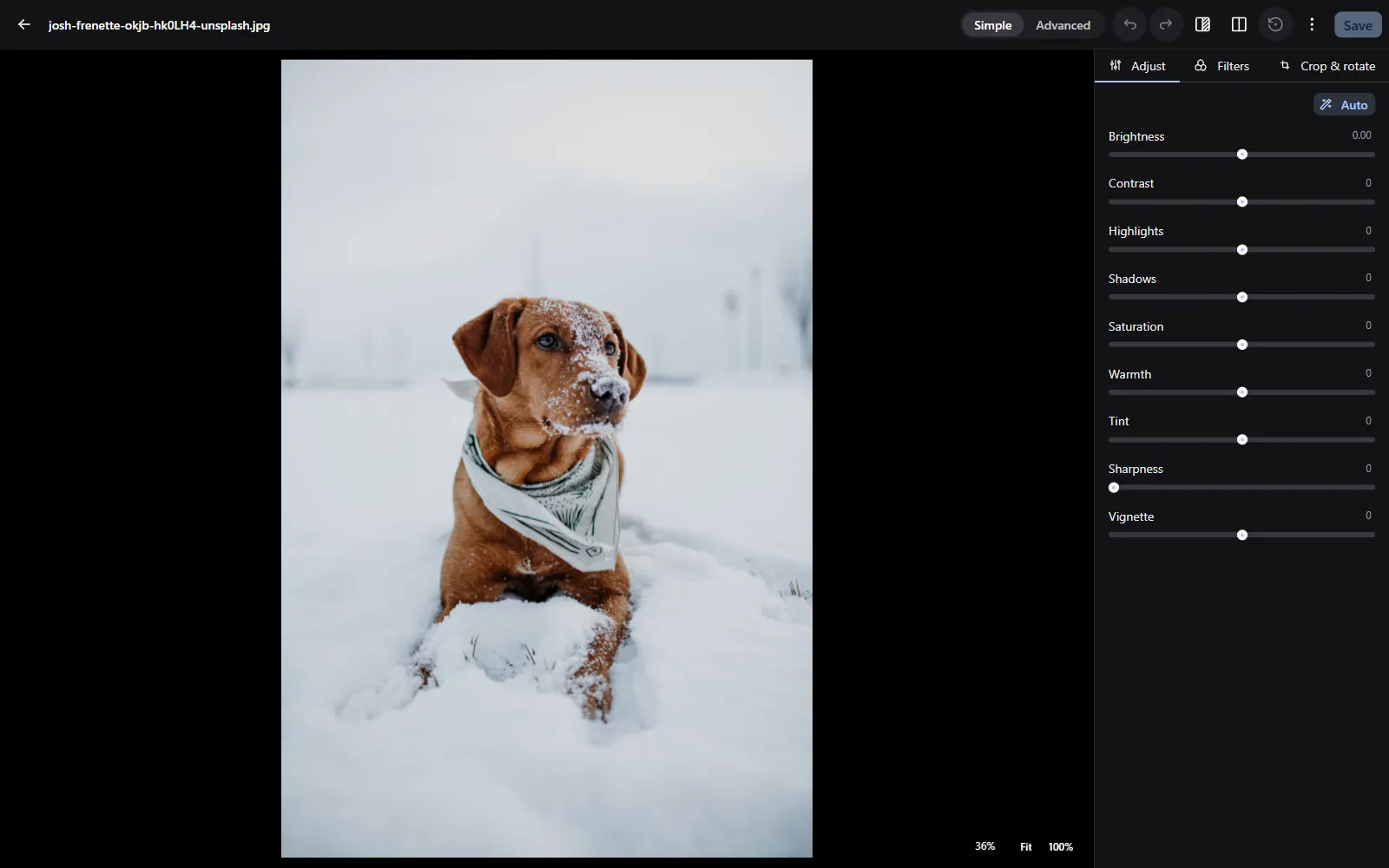
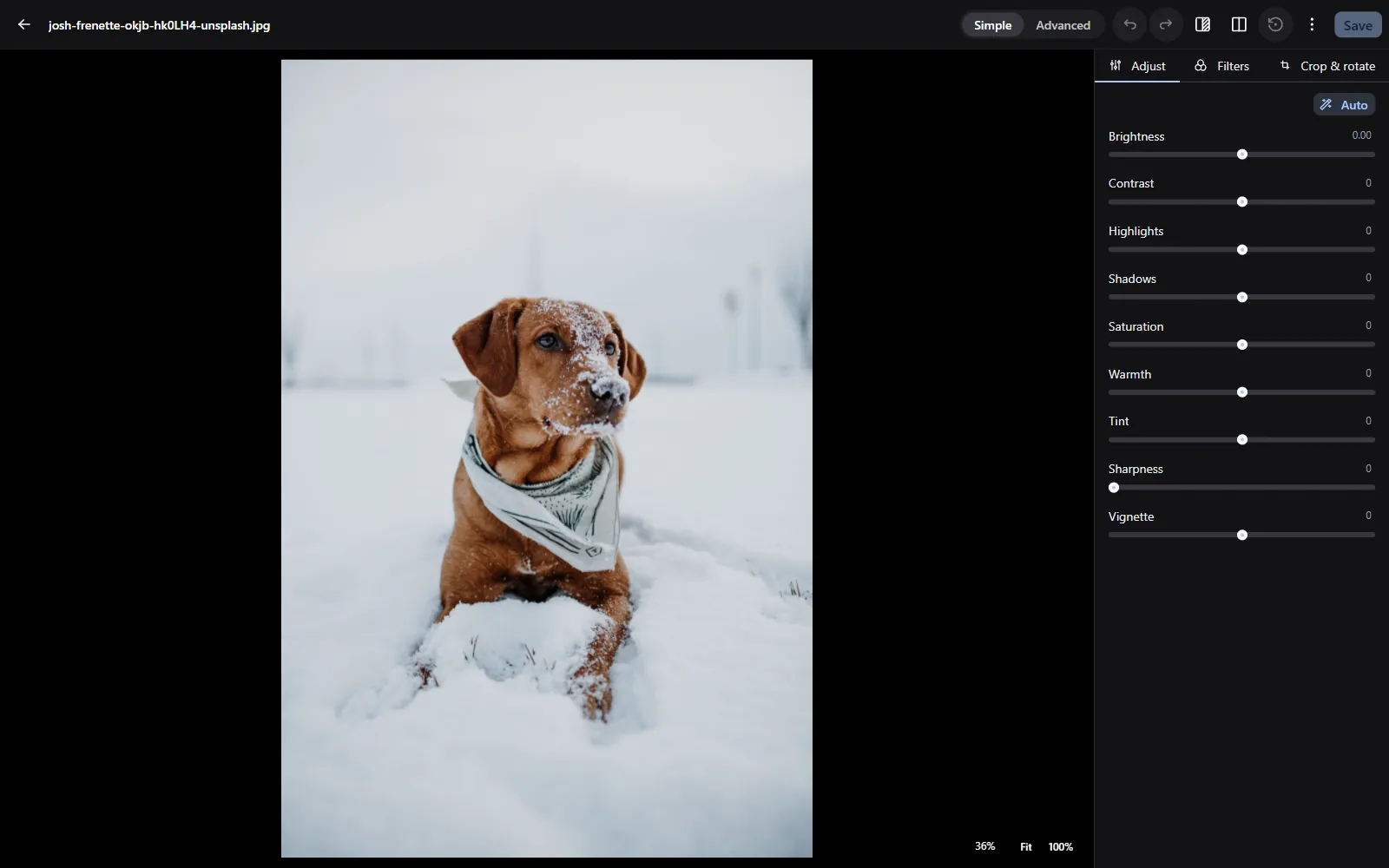
e, or click Edit, to crop and straighten it, pick a filter, or work on light and colour. Simple has a few plain sliders, Advanced has every control, also for RAW files. Your original file is never changed: an edit is kept as settings, and Revert to original... takes it back. See Editing photos. - Search now shows the best match first, by your words and by what the photo shows. Dates, people and places in your words narrow the results:
Halloween 2022,sea in France, or the name of a person you named. Words in the app's language find things too, soStrandfinds beaches in German. Find similar photos in the photo viewer's More actions finds photos like the one you look at. See How results are ranked. - LibrePhotos Viewer is a fast picture viewer for Windows and Mac that opens RAW files at once and can back up your folders to your server. Get it from the Microsoft Store. The LibrePhotos server now comes as an installer for Windows and as a Mac app for Apple silicon. See Desktop app and Mac app.
- A photo's Share link can expire after 7 days, 30 days or 90 days, and every public link has Show QR code to open it on a phone. Statistics has Cameras, with your cameras, lenses and exposure, and a Photos per day heatmap; the Places map can switch to a Heatmap. Search results and Videos can be sorted by file size, and Change date and time… can Convert photos between time zones. See QR codes and Cameras.
- Admins: the backend needs a quarter to more than half less memory than 1.6.0, and Scan Faces runs on several workers at once. Parallel workers in the Site settings chooses between Gentle, Balanced and Fast first import. See Limiting CPU and memory usage.
Before you update: Make a backup as usual. Background jobs now run on a new task queue; jobs waiting in the old one carry over by themselves.
After you update:
- Nothing to do for most of it. The editor, the new search and the lighter server work right away. Admins see two tasks on the Finish the upgrade card under Account menu > Admin area: Make placeholders for older photos and Remove the small thumbnails. Both start by themselves. Until the first one is done, older photos show a plain colour instead of a blurred preview while their thumbnail loads. This is the same on the Windows app and on Docker.
- Search by meaning is now on for everyone. The update turned semantic search on at Top 100 for every user who had it off. Nothing has to be done. To search by words only, with the results grouped by date as before, go to Account menu > Settings and set Semantic search max results to Off. If you search from the UhuruPhotos Android app, its releases up to 0.0.265 show no results while semantic search is on. See Enabling semantic search.
- Admins: check Parallel workers once. LibrePhotos now chooses the number of background workers from the cores and memory the server or container may use. On a large machine that is fewer than before: Balanced, the default, runs half the cores, at most 4. Workers start when there is work and stop 30 seconds after it, so Running now under Account menu > Admin area > Site settings > Parallel workers can show no worker active between jobs. Pick Fast first import for a big first import. If you skip this, LibrePhotos runs with Balanced. See Limiting CPU and memory usage.
- Windows app: update as usual, then move to the installed version. Optional. 1.6.0 gets this update with Download update and Restart to update, as before. After that, Account menu > Admin area shows a Move to the installed version card. Click Move to the installed version, then Restart to finish moving. LibrePhotos then runs from its own install, with a Start menu entry and Uninstall in Windows' Settings, and keeps your library, users and settings. It is done when the page reloads and a notification names the old folder, which you can delete. If you skip it, the unzipped copy keeps working and updating. See Moving to the installed version.
-
Admins: Docker, PostgreSQL, Kubernetes and API changes
PgBouncer: the backend turns off PostgreSQL's JIT compiler for its own connections with theoptionsstartup parameter. If LibrePhotos reaches PostgreSQL through PgBouncer, addoptionsto PgBouncer'signore_startup_parameters, best before you update, or PgBouncer refuses the backend's connections (details). Memory allocator: the Docker images start every process withMALLOC_ARENA_MAX=2andMALLOC_MMAP_THRESHOLD_=131072; set either to an empty value to get glibc's default back (details). Workers:workerConcurrency(WORKER_CONCURRENCY) still sets the number exactly; up to 1.6.0 the default was one worker per core of the host, whatever the container limit.WEB_MAX_REQUESTSnow defaults to10000instead of50(backend image) and2000(single container). Error reports: reports shared with the maintainers now go toerrors.librephotos.appinstead of the old GlitchTip host; allow it if your firewall filters outgoing traffic (details). Demo mode:DEMO_SITE=truenow makes the whole server view-only, for admins too (details). Kubernetes: the manifests indeploy/k8srun 1.7.0. API:GET /api/photos/searchlist/answers one flat list, best match first, for users with semantic search on, which is now nearly everyone;sort=newestoroldestorders the same matches by date. The/media/square_thumbnails_small/addresses still answer, with the square thumbnail.
Upstream:
🚀 Frontend: A Photo Editor, RAW Files Included
The web app has a non-destructive photo editor (#2999). Simple mode has Auto, nine plain sliders, twelve filters with a strength slider, and crop, aspect ratios, straighten, rotate and flip. Advanced mode, in the style of Lightroom, adds a histogram, a tone curve, white balance, an eight-band colour mixer, black and white, colour grading, texture, clarity, dehaze, grain, sharpening and noise reduction, presets, and copy and paste of an edit between photos. Every change is a step in a history of up to 200 steps that is saved with the edit, so undo and redo work again after a reload and on another device. An edit is a short list of settings stored with the photo: the browser previews it with WebGL 2, and the server renders the same settings from the original, so the thumbnails, the viewer, downloads and shares show the edited picture while the file stays as it was. RAW files are developed on the server from their RAW data with FlashRaw, 5 to 9 times faster than LibRaw, which takes over for files FlashRaw cannot read (#3063 adds Nikon's High Efficiency NEF). Canon CR3, Fujifilm RAF, Olympus ORF and Panasonic RW2 can now be uploaded through the web app too (#3064). Face boxes follow a crop or a turn, and people you share with only ever get the edited picture. See Editing photos.
🚀 Backend: Search Finds What You Mean, Best Match First
Search used to add the photos found by meaning to the word matches in no particular order, grouped by date. It is now one list ranked by reciprocal rank fusion of the word matches and the CLIP matches (#3128). Years, months, seasons, this year and last year, the people you named and your places become filters, with the photos of a place first and matches without a location after them, since most cameras record none. Words must match whole and count by where they appear: a person's name weighs most, then the place, things and tags, captions, the text in a photo and file paths, so car no longer finds a folder called cards. Words in the app's language are looked up in the Weblate translations of the 512 things, so Strand, plage and spiaggia find beaches, and libraries shared with you are searched by meaning too, under their owner's sharing switches. Find similar photos ranks the library by likeness to one photo. On a private set of 2,206 photos and 144 judged queries, nDCG@20 went from 0.27 to 0.77. Semantic search is on by default now, and the text model stays loaded in memory-mapped form, so the first search after a pause no longer waits seconds for it to load, as it did in 1.6.0 with semantic search on (#3147). See Search.
🚀 LibrePhotos: On Your Desktop, on Windows and on the Mac
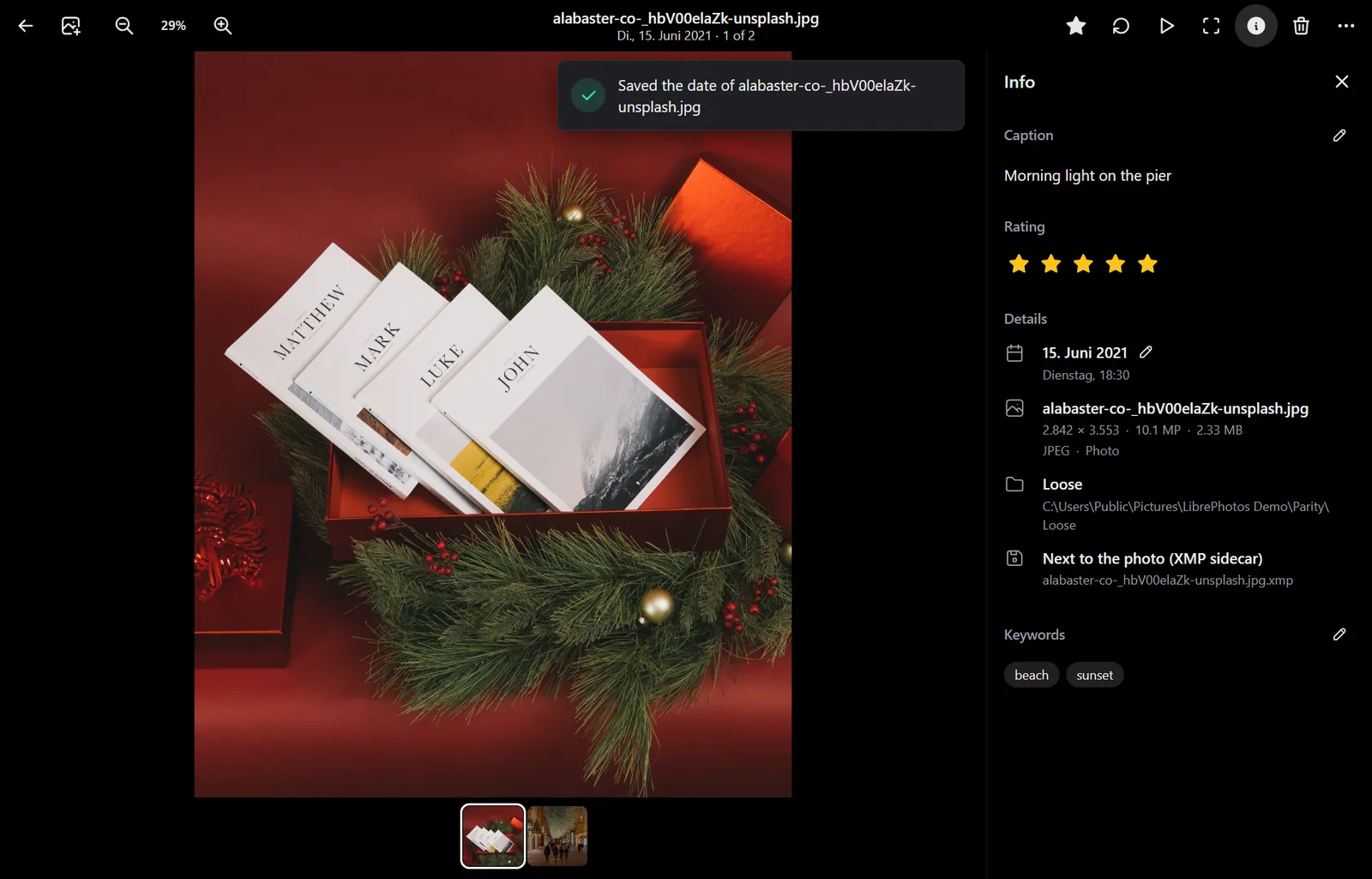
LibrePhotos Viewer is a new desktop app for Windows and macOS, a preview (#3062). It opens JPEG, HEIC, AVIF, JPEG XL, PNG, WebP, TIFF and camera RAW files at once, with a filmstrip, zoom to 100 % and tiles for very large pictures. It keeps a library of the folders you add, in place and watched, searches them, and writes ratings, captions and keywords into XMP sidecars that LibrePhotos, digiKam and darktable read. Signed in to a LibrePhotos server it backs up those folders, skips what the server already has, and shows what the server found. It works without a server and sends nothing anywhere on its own (privacy policy). It is in the Microsoft Store (#3115, #3148), and every release now carries its Windows installer and a Mac disk image (#3069, #3070, #3119, #3122). The on-device database moved into a package that the mobile app and the viewer share (#3065). The server itself now has a per-user Windows installer, LibrePhotos-Setup.exe, without administrator rights, and an unzipped copy can move into it from the Admin area without losing anything (#3116). LibrePhotos Server is also a Mac app for Apple silicon: a menu bar icon, opt-in Open at Login, and the same built-in updater as on Windows, with the previous release kept as the way back (#3120). See Desktop app, the Windows app and the Mac app.
🚀 Backend: A Task Queue of Our Own, and a Server That Fits Its Machine
Background jobs run on a task queue that LibrePhotos owns, in its own database tables, instead of django-q2 (#3076, #3085, #3088). The number of workers follows what the server or container may use, read from its cgroup limits, and the Parallel workers choice in the first-time setup and the site settings (#3078, #3090, #3093). Scan Faces works in batches of 64 photos, and each heavy worker gets a face service of its own (#3089, #3097). Only the workers of the current width run, workers start for work and stop after 30 seconds without it, the Docker images fork their task and web workers from a process that loaded Django once, and they set glibc's allocator to give memory back (#3144, #3147). Measured on the same machine, the backend container needs 24 to 62 % less memory than 1.6.0 in every scenario: about 600 MB instead of 800 MB idle, and 1.6 GB instead of 2.9 GB at the peak of a scan. PostgreSQL's JIT compiler is off for the backend's connections, since it spent up to a second compiling queries that run in milliseconds, and SQLite keeps its planner statistics current, which took Scan Faces on a fresh 100,000-photo database from seconds per saved face to milliseconds (#3072). Reported by metamountain (#3071). Every change to the database since 1.6.0 is now rehearsed in CI on a database made by the released 1.6.0 image, on PostgreSQL and SQLite, which found and fixed an upgrade failure on PostgreSQL before it shipped (#3141). See Limiting CPU and memory usage.
🚀 LibrePhotos: Fewer Dependencies, No Known Vulnerabilities
About thirty third-party packages were replaced with small code of our own or the standard library, among them PyExifTool, FAISS, pyocclient, pytz, timezonefinder, gevent, Flask, django-cryptography, lodash, motion, recharts, tiptap and the Mantine date pickers, in pull requests from #2978 to #3092. The ExifTool client has timeouts and no longer hangs on a dead ExifTool, the similarity index is a memory-mapped file that no longer peaks at several GB on a million photos, and ffmpeg and OpenCV are minimal builds of our own: about 280 MB less in the x86_64 image (#3083, #3087, #3095). The backend images moved from Ubuntu to Wolfi, and Trivy now finds no known vulnerability in any of the five images, against 44 to 571 before, with scans in CI that keep it that way (#3117). The web app loads less up front: the photo viewer, its map and its caption editor load when you open them (#2986, #3079).
- ✨ Frontend: A photo's Share link can expire, with the same 7 days, 30 days, 90 days and Never choices as album links (#3106), and every public link has Show QR code (#3107) (Implemented by sanketpatel32)
- ✨ Frontend: Statistics has Cameras, with cameras, lenses and the spread of ISO, aperture, focal length and shutter speed, each one click from its photos (#3105), a Photos per day heatmap, and Places a Heatmap map display (#3102, #3110) (Implemented by sanketpatel32)
- ✨ Frontend: Sort on search results and Videos offers Largest files first and Smallest files first (#3103), and Change date and time… has Convert to move photos from one time zone to another (#3104) (Implemented by sanketpatel32)
- ✨ Frontend: Wall display in the photo viewer's More actions keeps the screen awake during a slideshow, puts it to sleep on a schedule and protects it from burn-in (#3101) (Implemented by sanketpatel32)
- ✨ Frontend: Photo grids show a blurred ThumbHash of each photo while its thumbnail loads, load every day on screen at once instead of one after another, and cache thumbnails in the browser; the 250 px small thumbnails are no longer made (#2961, #2962, #2963, #2965)
- ✨ Frontend: German, Italian, French, Spanish, Brazilian Portuguese, Dutch, Japanese, Simplified Chinese and Korean are complete, the names of things included (#2964)
- ✨ Frontend: The photo viewer follows your finger when you swipe to the next photo and zooms around your fingers (#3091); the caption box suggests your hashtags after a
#(#3081); dates use your browser's own date and time fields (#3084) - ✨ LibrePhotos:
DEMO_SITE=truemakes a server a view-only demo, running at demo.librephotos.app (#3132, #3139) - ✨ Docs: A filterable feature comparison with 15 other photo apps (#3002), a public roadmap (#3131), a LibrePhotos Viewer page (#3125) and use cases for photographers, archivists, families and self-hosters (#3126)
- 🔨 LibrePhotos: Jobs, trash, faces, uploads, settings forms and the photo viewer now change state in one safe step each: a job ends once and reaches 100 % with its last photo, a stale save no longer takes a photo out of the trash or undoes a hide, a form keeps what you type when the page refreshes its data, and two uploads of one file import it once (#2966 to #2977, #2982)
- 🔨 LibrePhotos: Fixes for the errors 1.6.0 servers reported, among them model downloads that raced, "database is locked" on SQLite, a Windows app whose jobs never started, slow-motion videos whose previews timed out, scans that failed with "could not resize shared memory segment", and tabs left open across an update, which now reload once (#3057, #3059, #3060, #3124, #3127, #3129, #3130)
- 🔨 Backend: Remove missing photos removes a photo whose file is gone in one run, and keeps a RAW+JPEG photo whose RAW is still there (#2997) (Implemented by dotanm)
- 🔨 Backend: Writing metadata updates an existing XMP sidecar in place, so its owner, permissions and ACL on a NAS share stay. Reported by parelio (#2960, #3068) (Implemented by dchaudhari7177)
- 🔨 Backend: JPEG XL files get their date, camera and location again in the Docker images. Reported by stianpram (#3074, #3108) (Implemented by sanketpatel32)
- 🔨 Frontend: A rotated photo shows turned in every grid at once, without clearing the browser cache. Reported by masch3000 (#2998, #3143)
- 🔨 Frontend: A long page title keeps its room on tablets and in narrow windows: the toolbar buttons turn into icons instead (#3159)
- 🔨 Backend: Time zones of GPS positions come from ExifTool's offline database instead of timezonefinder, and building one lookup no longer costs a second per photo (#2980, #3082)
- 🔨 LibrePhotos: Reports shared with the maintainers go to a lighter error tracker at
errors.librephotos.app(#3133) - 🔨 LibrePhotos: Dependency updates for the web app, the mobile app, the desktop app and the images, among them Node.js 24.22.3 and Bun 1.4.5, and the Kubernetes manifests in
deploy/k8srun 1.7.0 - 🔒 Backend: The Nextcloud app passwords and the email secret are stored by our own encrypted fields instead of django-cryptography, which unpickled what it decrypted; nothing changes on disk (#3086)
- 🔒 Backend: Single sign-on no longer links a deactivated account, which used to sign in as soon as it was turned on again (#2977)
- 🔒 LibrePhotos: Pull request builds no longer see the Apple signing and store secrets (#3135)
Full changelog: https://github.com/LibrePhotos/librephotos/compare/1.6.0...1.7.0
If you are interested in how I develop this application, you can watch me develop features live on my channel
Sponsoring development:
My work is sponsored by 3 awesome people!
If you like the work I do, then you can support me via GitHub sponsors or via PayPal